🔒 mtls vs mysqli
enforcing client certs when the php driver doesn't cooperate
tl;dr
If you turn on client certificate enforcement for a WordPress site's database, it will break, and the error will point you at the wrong thing. WordPress passes MYSQL_CLIENT_FLAGS to mysqli_real_connect() but never calls mysqli_ssl_set(), so the MYSQL_SSL_CA, MYSQL_SSL_CERT and MYSQL_SSL_KEY constants you dutifully added to wp-config.php are read by nothing. The connection goes out without a client cert, MySQL rejects it as Access denied, and you spend a while investigating credentials that were fine all along. The fix is a db.php drop-in that subclasses wpdb and makes the missing call.
the problem
A fairly ordinary setup: WordPress on a Compute Engine VM, talking to Google Cloud SQL over a private IP inside the same VPC. That's a small threat surface to begin with, but private networking doesn't encrypt anything by itself. If you want connections inside the VPC to be encrypted, and the client to prove who it is (mTLS), you have to ask for it explicitly.
Example Terraform IaC to configure a Cloud SQL instance to allow only encrypted connections:
resource "google_sql_database_instance" "main" {
  name             = "my-postgres-instance"
  database_version = "POSTGRES_18"
  region           = "europe-west2"

  settings {
    tier = "db-f1-micro"
    ip_configuration {
      private_network = "projects/vpc_project_id/global/networks/vpc_network_name"
      ssl_mode = "ENCRYPTED_ONLY"
    }
  }
}
settings.ip_configuration.ssl_mode can be one of:
ALLOW_UNENCRYPTED_AND_ENCRYPTED: Allows both unencrypted and encrypted connectionsENCRYPTED_ONLY: Only encrypted connections are allowedTRUSTED_CLIENT_CERTIFICATE: Only connections from trusted client certificates are allowed
the start of the journey
I started out by enabling the TRUSTED_CLIENT_CERTIFICATE ssl_mode on a dev instance and seeing what would happen. As expected...

Okay, so just drop some certs on the client side and set the ssl_mode to ENCRYPTED_ONLY and we're done, right? Push the certs to the host with Ansible, then make sure wp-config.php is configured to use them.
- name: Ensure MySQL certs directory exists
  ansible.builtin.file:
    path: "{{ mysql_certs_remote_dir }}"
    state: directory
    owner: root
    group: www-data
    mode: "0750"
  become: true
  tags:
    - mysql
    - mysql_certs

- name: Push CA certificate, client certificate, and client key to host
  ansible.builtin.copy:
    src: "{{ mysql_certs_src_dir }}/{{ inventory_hostname }}/{{ inventory_hostname }}-{{ item.name }}.pem"
    dest: "{{ mysql_certs_remote_dir }}/{{ inventory_hostname }}-{{ item.name }}.pem"
    owner: www-data
    group: www-data
    mode: "{{ item.mode }}"
  become: true
  no_log: true
  loop:
    - { name: server-ca, mode: "0644" }
    - { name: client-cert, mode: "0644" }
    - { name: client-key, mode: "0640" }
  tags:
    - mysql
    - mysql_certs

- name: Manage MySQL SSL block in wp-config.php
  ansible.builtin.blockinfile:
    path: "{{ wp_root }}/wp-config.php"
    marker: "// {mark} ANSIBLE MANAGED MYSQL SSL BLOCK"
    block: |
      define( 'MYSQL_CLIENT_FLAGS', MYSQLI_CLIENT_SSL);
      define( 'MYSQL_SSL_CA', '{{ mysql_ssl_ca_path }}' );
      define( 'MYSQL_SSL_CERT', '{{ mysql_ssl_cert_path }}' );
      define( 'MYSQL_SSL_KEY', '{{ mysql_ssl_key_path }}' );
  become: true
  notify:
    - "Reload php-fpm for MySQL SSL config"
  tags:
    - mysql
    - mysql_ssl
early feedback
It appears that the certs are being pushed correctly, wp-config.php is configured to use them, and php-fpm is reloading. However, the error persists. Lets try look to the logs.
Google Cloud SQL logs show me that all is not well.
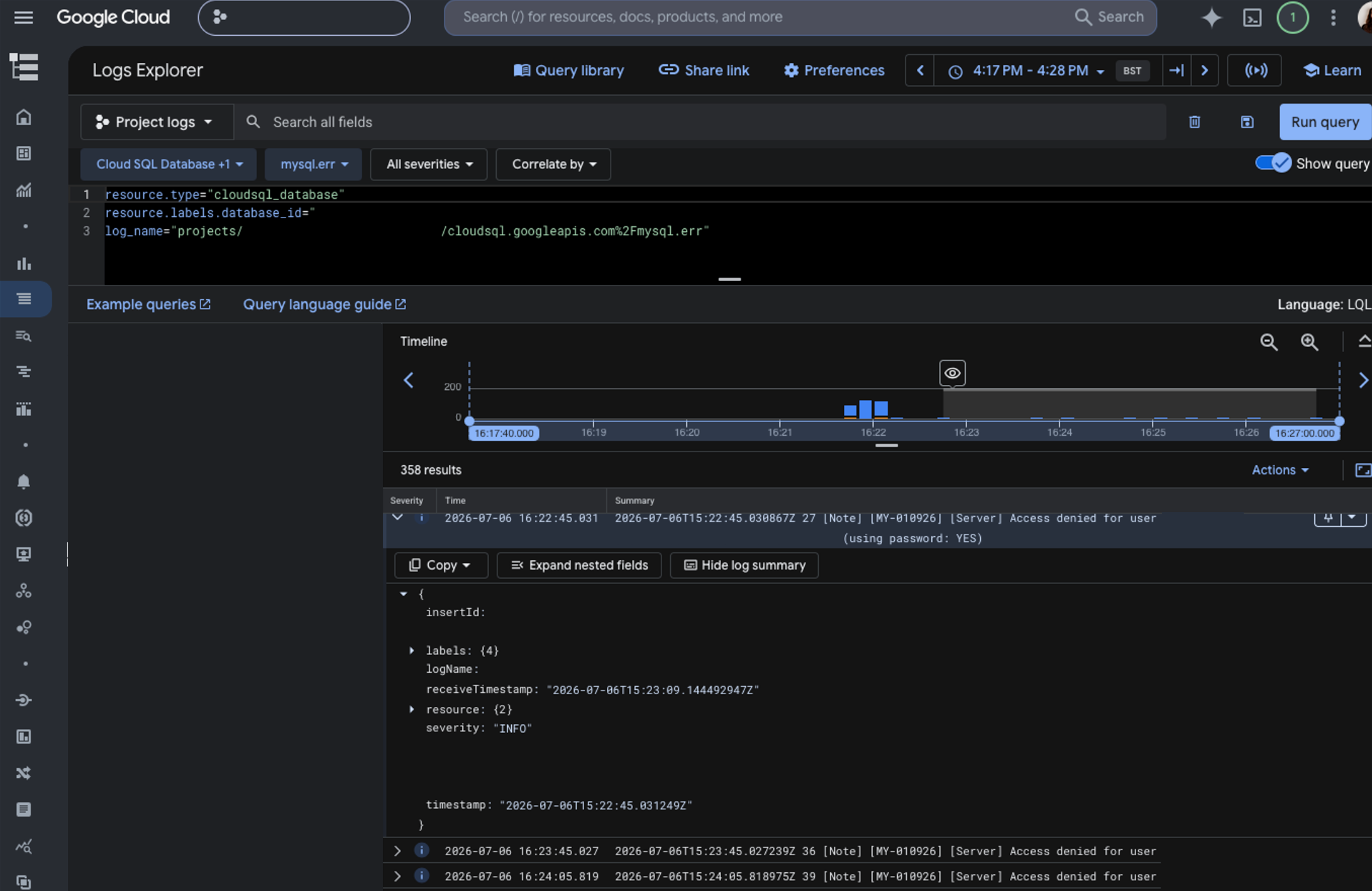
They report that Access denied for user 'user@host' (using password: YES). Interesting, I've not changed anything about the credentials mechanism.
what wordpress actually does
Nothing about the credentials had changed, so I went and read what WordPress does with them. wp-includes/class-wpdb.php, inside db_connect():
@mysqli_real_connect( $this->dbh, $host, $this->dbuser, $this->dbpassword, null, $port, $socket, $client_flags );$client_flags comes from MYSQL_CLIENT_FLAGS, so the MYSQLI_CLIENT_SSL flag does get through. The other three constants don't. Nothing in core reads MYSQL_SSL_CA, MYSQL_SSL_CERT, or MYSQL_SSL_KEY, because core never calls mysqli_ssl_set(). That carefully templated Ansible block was writing four constants, three of which were decoration.
So WordPress was asking for TLS and presenting no client certificate, and the server was turning it away.
That also explains the misleading error. When an account has an SSL requirement the client doesn't meet, MySQL deliberately returns a generic ER_ACCESS_DENIED_ERROR rather than an SSL-specific failure, so it doesn't tell an attacker why they were rejected. Good for security, less good when you're staring at it.
To make sure I wasn't inventing a narrative, I reproduced it outside WordPress: a standalone PHP script run as www-data with the same binary WP-CLI uses, making the same mysqli_real_connect() call with the same flags. bool(false), and the identical access denied. Then one line added before it:
mysqli_ssl_set($db, $key_path, $cert_path, $ca_path, null, null);bool(true), and SHOW STATUS LIKE 'Ssl_cipher' came back ECDHE-RSA-AES128-GCM-SHA256. Same credentials, same host, same certs as the failing version, so that call was the entire difference.
the solution
This is a known gap rather than something I'd broken. Trac #28625 has been open since 2014 proposing native support for these constants, and #61856 revisits it. Neither has landed.
The sanctioned workaround is a db.php drop-in in wp-content/. WordPress loads it instead of the stock wpdb, so you subclass wpdb, mirror db_connect(), and add the missing mysqli_ssl_set() call using the constants that are already sitting in wp-config.php. No core files are touched, and deleting the file reverts to stock behaviour. xyu/secure-db-connection is a public example doing exactly that.
Ship it from the same role that manages the certs and the constants, so the three always travel together. Otherwise a host eventually ends up with certificates and nothing that reads them, and someone gets to rediscover all of this from scratch.
What I'd do differently is check Ssl_cipher on the application's own connection before assuming the config did anything. Enforcing TLS at the platform doesn't mean the client is using it, and a constant sitting in wp-config.php doesn't mean anything reads it.
Also... Keep tabs on WordPress core tickets from 12 years ago! 😂